
4 SEO Checks That Could Save Your Rankings

I had a cyber client where we were producing great SEO articles. We did our keyword research, high quality content, super optimized… the whole nine yards.
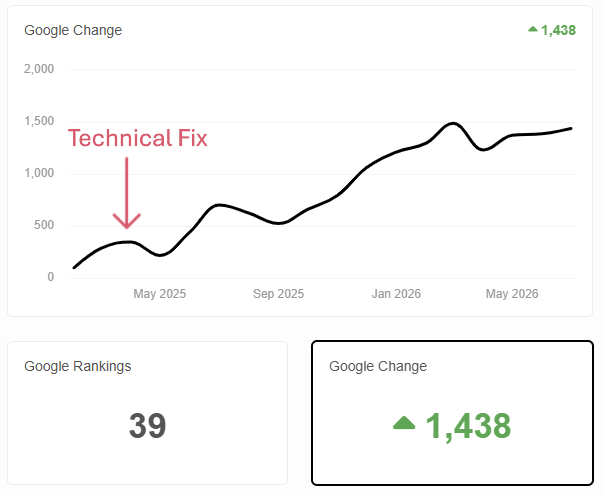
Google would pick these articles up and rank them on page 1 almost immediately. And then the next week, they’d disappear. The line showing their rankings looked like a really intense rollercoaster. I'm pretty sure there was a loop-de-loop in there somewhere. We were ready to pull our hair out.
And then, aha!, we realized it was a technical issue. We fixed it, their rankings went up and stayed there. It's been probably a year since we fixed that, and their articles are still performing well.
That was a pretty frustrating experience, so here are 4 things you can check right now to make sure this doesn’t happen to you.
4 Checks to Keep Your Rankings Off the Rollercoaster
Google Search Console’s Indexing Report
This tool tells you what pages aren’t indexed and why (and it’s 100% free). 3 items to check:
- Crawled - currently not indexed: make sure there are no URLs in this list that you do want indexed. Also make sure there are no URLs in here that you weren’t aware existed.
- Not found (404): this should always be 0.
- Excluded by ‘noindex’ tag: again, there shouldn’t be URLs in this list that you want Google to rank, and there shouldn’t be any URLs that you don’t know the origin of.
This report is what showed me that my client’s site was auto-generating 5 broken URLs for every 1 good one they published. Your SEO/GEO-optimized pages can be awesome, but if you've got dead weight sitting on the side, it's going to sink your ship.
Google Core Web Vitals
Pages have to load quickly for a good user experience for readers, traditional search bots and AI bots, and Core Web Vitals is a fast and free way to see major issues with page load speed and UX. Open the report via Search Console, and make sure you have all “good” URLs and no “poor” URLs in both the mobile and desktop reports.
Screaming Frog
Run a full crawl, then check:
- 404 report: there should be 0 URLs in this list.
- 301 report: you shouldn’t have a ton of 301s, and you should know why each of them is in place.
- Issues panel: see if there are issues with heading structure, missing titles/metas, canonicals, etc. If there's a big number tied to any of the issues in this report, fix it.
Robots.txt
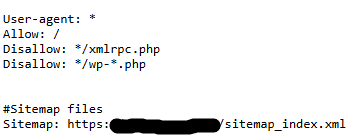
Make sure Googlebot and AI bots are allowed, and make sure dev/staging environments are disallowed. A good setup is user-agent all allowed, then a disallow section for admin pages, staging site, anything that’s password protected (see below).
Maintenance is Key
All 4 of these checks can be done in under an hour, so I highly recommend running through them at minimum every 1-2 months. Errors can spring up fast and Google isn’t known to pull their punches. Spot-check daily to weekly between full crawls. If everything's good on your site, you'll actually be able to see it: no 404s, robots.txt is clean, indexing report looks great, etc. But if there are issues, you'll catch them before they drag down the content you’ve worked so hard to create.